

For years, New York cultivators relied on journals, whiteboards, and internal spreadsheets to keep the business running. It was a manual process where you wrote down what you did and tried to save that somewhere, hoping those records stayed organized enough to be useful later.
Then came the mandatory migration from BioTrack to Metrc, which kicked off in December 2025, when all licensees had to log their inventory, and rolled out fully into 2026.
Suddenly, those handwritten notes and legacy platforms had to move into a rigid, digital environment. But the logic of the new system isn't always clear. Between technical bulletins and frequent software updates, one of the biggest points of confusion is how to track plants in Metrc under New York's cultivation rules without making a mistake that triggers an audit.
When do you pull a tag? Where does that tag go? How do you maintain a clean chain of custody throughout your facility? This step-by-step walkthrough clears up the uncertainty by breaking down the exact regulatory requirements for every phase of the growth cycle.
How Metrc Plant Tracking Works in New York (The Logic First)
Before you start clicking buttons, you need to understand how the OCM views your operation. They don't expect you to tag every single seedling the day it pops. Because of the high loss rates in a nursery, individual RFID tags are reserved for plants that have proven they'll make it to harvest. This is why the system is split into two phases: batch tracking for the little ones, and individual tracking for those that are stable and ready for the vegetative stage.
During propagation, your seedlings, clones, and tissue cultures are tracked as a collective group. You create an immature plant batch in Metrc for up to 100 starts of the same strain (no mixing allowed), but physical RFID tags aren't necessary at this stage. You just need the digital record and a physical label on the tray.
Once a clone or seedling reaches 6 inches tall, it officially enters the vegetative phase. This is when you have to assign a unique UID to each cannabis plant in your New York grow room, physically tagging up one of the lowest branches on the stalk.
What You Need Before You Start
- Metrc Credentials: You can't just log in right away. You have to register as a new user and finish the New Business Fundamentals training through Metrc Learn. Once the OCM verifies you, you'll get an email to set up your account and add the necessary employees/permissions. Be sure to log in within 72 hours, or that link will expire.
- Physical RFID Plant Tags: Order these through the system early. They usually take about a week to arrive. Since tags are programmed for your specific facility and aren't transferable, double-check that you're in the correct profile before you hit buy. As soon as they're delivered, you have to officially accept the package in Metrc to get them into your inventory.
- A Third-Party Integrator: Per state regulations, you must use an inventory tracking system that integrates with Metrc.
Perks for New York Cultivators: Metrc provides 2,500 RFID plant tags to each cultivation license at no cost through an initial allotment credit. After you use those, you can purchase more for $0.10 each. These credits don't expire and can be used at any time. Also, you can personalize your physical tags by writing strain names with an indelible marker, using a thermal printer, or attaching a printed sticky label to the back field so you can stay organized.

Step 1 , Track Immature Plants as Batches in Metrc
In New York, you have three calendar days from the time you acquire or snip a clone to record it in Metrc. Since you aren't using physical RFID tags yet, the "tagging" is mostly digital. You assign your immatures to a lot, name it virtually, and then physically label that group or tray with the batch name so it matches what's in the software.
This is how you generally create an immature plant batch in Metrc:
- Identify and select your source. You must tell Metrc where the plants are coming from.
- If taking cuttings: Go to the Plants menu, select the Vegetative or Flowering tab, and check the box next to the "mother" plant you're cutting from.
- If planting seeds or purchased clones: Go to the Packages menu, select the Active tab, and check the box next to the package of seeds/clones you just received.
- Click the Create Plantings button while you're still looking at your mother plant or your source package. This links the lineage automatically.
- Enter the details:
- Batch name: Choose a unique name. We recommend using a consistent naming convention, such as Strain_Date, to make them easy to find as they move through the facility.
- Planting date: Record the exact day you took the cuttings or planted the seeds.
- Strain and location: Select the specific strain and the room where the tray sits.
- Count: Enter the number of starts (max 100 per batch).
- Submit by clicking Create Plantings at the bottom of the window and generate a digital UID for the group, which will now appear in your Plants > Immature tab.
- Label the batch physically. Since there's no RFID tag, you must physically write or print the batch name, strain, and 24-digit UID, and attach it to the tray or container. This is how the OCM links your physical inventory to the software.
- Verify the record. Go to the Plants menu and select the Immature tab to confirm your new batch appears in the list with the correct plant count.
If plants in your batch die, you don't delete the group. You use the Destroy Plants button within that specific batch to reduce the count and make sure it reflects the loss. This keeps your digital records accurate and creates the required audit trail for the OCM.
Step 2 , Assign Individual UIDs When Plants Enter the Vegetative Phase
As your crop gets bigger, you have to start using Metrc for vegetative phase tracking, which ensures every plant is officially accounted for and traceable. Here's how to handle that transition correctly:
The 6-Inch Trigger
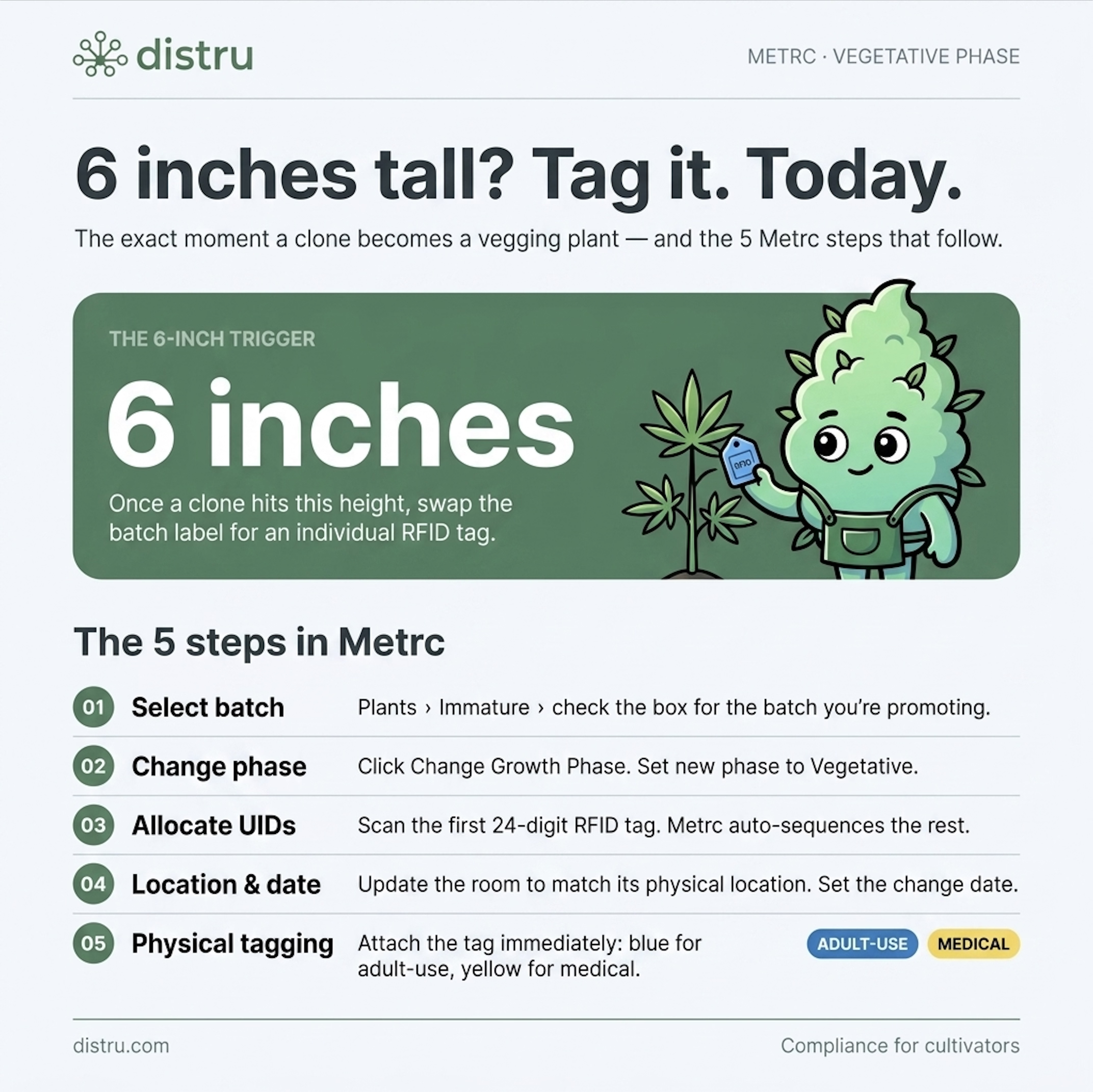
Once a clone or seedling hits 6 inches tall, it officially becomes a vegging plant. This is the exact moment you must move it out of the immature group, give it an individual identity, and swap that batch label for a physical RFID tag.
Don't let your plants outgrow this stage without updating the system, as having a 7-inch plant without a tag is an easy way to get flagged during an inspection.
How to Update the Plant Status in Metrc
To graduate your plants from the Immature Batch to Vegetative status in Metrc, you have to pull from your inventory of individual UIDs, assign one to every plant, and record their new stage, location, and move date. This is how you do it:
- Select Batch: Go to Plants > Immature and check the box for the batch you're promoting.
- Change Phase: Click the Change Growth Phase button. In the pop-up, set the new phase to Vegetative.
- Allocate UIDs: Assign a 24-digit RFID plant tag to each individual plant. Metrc usually allows you to scan the first tag in your physical stack, and then it automatically sequences the remaining tags for the rest of the plants in that batch.
- Update Location and Date: Update the room (must match its physical location) and set the change date.
- Physical Tagging: Immediately attach the blue (adult-use) or yellow (medical) RFID tags.
Where to Physically Attach the RFID Tag
When it comes to assigning a Metrc plant tag, proper placement is as important as the tag itself. You must attach it to one of the lowest branches at the bottom of the stalk, keeping these rules in mind:
- Don't bury the tag in soil or substrate. It must be up and out of the growing material.
- This UID stays with the plant until it's harvested or disposed of. You can't remove or swap the tag once it has been assigned and attached.
- The tag must be clearly visible to an inspector standing next to the plant.
If you're growing multiple cultivars in the same room, write the strain name on the tag before you strap it to the plant. It makes life much easier when you're doing canopy work later on.
Step 3 , Log Every Plant Movement Between Rooms or Zones
Metrc acts like a digital GPS for your crop. The state needs to know exactly where your inventory is at all times. When a plant moves from one room, zone, or area to another, that change has to be logged.
New York laws say that you must record your nursery and cultivation activities within 3 calendar days. This includes:
- Growth Phase Changes: Transitioning plants between growth stages, such as flipping to flower, or moving immature lots into the canopy.
- Tagging: Assigning individual Metrc UIDs to plants as they graduate from the nursery.
- Physical Relocation: Transferring inventory between indoor, greenhouse, or outdoor zones.
- Quarantine: Isolating specific plants in a designated area for observation or compliance holds.
- Agricultural Inputs: Applying any pesticides, nutrients, and other substances.
- Harvesting: Cutting and weighing a mature cannabis plant (or even just a portion of it) for further processing.
- Testing: Pulling and prepping the necessary samples from your harvest to send to the lab.
- Destruction and Waste: Destroying or disposing of any mature or immature plant material.
While that 3-day window might sound generous, you don't want to let these tasks pile up. The OCM can pull a plant's location history at any time. If an inspector walks into a room that's physically empty but digitally full in Metrc because you moved the crop 48 hours ago without an update, you're technically out of compliance.
Also, the clock ticks much faster if something goes wrong. If you notice any security breach, theft, loss, or major error in your inventory count, specifically a discrepancy of 2% to 5%, depending on your tier, you have to notify the OCM within 24 hours.
Practical Tip for Your SOPs: Use a tool like Distru to log the day's movements as they happen and, if necessary, build a quick check-in at the end of every shift where your cultivation lead verifies all physical moves are reflected in the system. This one habit makes tracking cannabis plants in New York second nature, so you can breeze through an unannounced audit without the usual headache.
Step 4 , Track Plants Through the Flowering Phase
Once your plants are flowering, you should keep tracking them. You have to update the status from Vegetative to Flowering by going to the Vegetative tab in Metrc, selecting them, and clicking the Change Growth Phase button.
You don't need new tags yet. The same UID from the vegetative stage follows the plant all the way through the rest of its lifecycle. But to maintain compliance during this phase, you must document every change and loss in real-time, including:
- Phase Updates: If your facility tracks specific sub-phases (like early vs. late flower), make sure the system reflects the plant's actual progress.
- Plant Deaths or Destruction: If a plant dies or needs to be culled, you must log it, noting the reason, whether it's a pest issue, disease, or crop failure, in Metrc before physically removing it. Doing it after the plant is gone looks like shrinkage or diversion to an auditor.
- Selective Culling: Even if you're just removing a few underperforming plants before the main harvest, the process is the same. Log in to Metrc first, document the reason, then remove.
Beyond reporting in Metrc, you should maintain detailed records of your grow, such as:
- Genetics and Inputs: A database of all seeds or clones and their sources, plus a list of every agricultural input used (nutrients, pesticides, foliar sprays), including product names, active ingredients, application rates and methods, timing, and who applied them.
- Maintenance and Sanitation: A history of equipment upkeep (detailing the type of work, the date, and the technician) and routine cleaning schedules for all containers, tools, and areas.
- Waste Tracking: A breakdown of all disposal, composting, or remediation methods used on site.
- Resource Use: A summary of water needs and energy consumption (Power Score), as well as your sustainability and regenerative practices.
- Pest Management: A map showing the layout and numbering of all traps and sensors, alongside notes on their maintenance and any evidence of animal or insect presence in the facility.
- Testing and Lab Results: A library of COAs for both contaminants and cannabinoids.
- Staff and Safety Protocols: Documentation of employee training, security measures, and workplace safety standards.
To sum up, if you touch the plant, feed the plant, or clean the room the plant lives in, there should be a record of it.
Step 5 , Harvest Plants and Convert to Packages in Metrc
Harvest day is the finish line, but in Metrc, it's also the start of a new tracking process. When you cut those plants down, they transition from individual UIDs into a harvest batch, which remains in the system while the material is dried and cured. Once your flowers are shelf-ready, you'll convert them into individual packages.
A standardized harvest workflow is essential for tracking cultivation in Metrc New York. Here's how to set it up:
Initiating the Harvest Teardown
You should log the harvest the moment you cut the plants and pull them from the grow room. Not before. Not a few days later.
To update this plant teardown in Metrc, go to the Flowering tab, select the specific UIDs being harvested, and click the Harvest button. You'll have to record the wet weight for each individual plant as you cut them. Then, the system groups them under a unique harvest name (you have to create it).
Since the plants are no longer tagged individually, you must immediately place the assigned harvest batch name within clear view of an individual standing next to them while they're hanging, drying, or curing. This way, the physical product is always linked to the digital record in Metrc.
If you're using containers, the harvest batch name has to be affixed to each one. For batches held in multiple bins, the harvest batch name and UID should be on every container and every unit within them. Also, all containers with the same lot identifier must be placed contiguously (side-by-side) to one another so it's easier for the OCM to identify them.
If you're performing a staggered harvest, you need to maintain specific records of the proposed harvest periods and dates.

Recording Wet and Dry Weight
New York is rigorous about granular weight reporting. Weights should be logged the moment the plants are cut. This initial figure must include the entire plant: stem, stalk, bud, and leaves. Later, after the drying and curing process is complete, you'll enter the dry weight. Metrc tracks both, so a variance between the two is expected due to moisture loss.
You must also record the weight of any cannabis waste generated during the harvest (such as fan leaves or root balls). In the Harvested tab, select your batch and use the Report Waste button. These entries can be submitted as many times as necessary, as long as they're all reported within the same day the waste is created.
Tip for Accuracy: Hand-entering weights is the easiest way to make a mistake. Use a Bluetooth scale that integrates with your internal tools to eliminate fat-finger errors and keep your reports clean.
Creating Packages from Your Harvest
Once your products are dried and cured, you'll move them into their final form, usually as buds or shake. You perform the conversion to package UIDs by using the Create Packages button in Metrc's Harvested tab to pull the specific weight you want for your new units. This action generates a unique package UID for that material.
Important Note #1: If you operate a vertically integrated microbusiness or package for direct-to-retail (including sales to your own customers), you must also assign a Retail Item ID to each unit.
Each UID in your Packages grid should have a detailed history that includes the source harvest, strain, category, quantity, status, and eventually, the lab results.
Metrc package tags follow the product downstream through lab testing, processing, distribution, and transfer, whether internal or external, so you must label every container and attach its corresponding Metrc UID before it leaves your facility.
When it's time to move a product, use the Transfers dropdown on the navigational toolbar to generate a manifest. You need this documentation any time a package moves to another licensed facility, even if it's just the testing lab or another building on the same property.
Important Note #2: A destination facility can reject a shipment. If this happens, you must formally return those specific UIDs to your active stock in Metrc to keep your balances accurate and prevent ghost inventory from lingering on an open manifest.
Finalizing the Batch
A harvest remains active in the eyes of the state as long as there's weight left in the system. The process is only complete when the batch weight hits zero, meaning you have packaged all usable material and reported every bit of physical waste. At that point, select the batch in the Harvested tab and click the Finish button to officially close it out in Metrc.
Common Mistakes New York Cultivators Make in Metrc Plant Tracking
Even the best teams can trip up on the technicalities of a new system, especially during the busiest stages of the lifecycle. To help you avoid common pitfalls, we've outlined the most frequent errors you can make when tracking a plant in Metrc as a cultivator and how to fix them before they trigger an audit:
| Mistake | What Goes Wrong | The Fix |
|---|---|---|
| Not tagging at 6 inches | You're still tracking them as a group when they need individual tags, leaving you wide open to a compliance flag. | Train your staff on the 6-inch trigger and check height daily. |
| >100 plants per batch | You've lumped too many plants together, which automatically violates batch limits and halts your tracking. | Split large runs into multiple batches of 100 or fewer before entry. |
| Mixing strains in a batch | You've blended different genetics in one group, which compromises identity and scrambles your data because Metrc requires single-strain batches. | One batch = one strain. No exceptions. |
| No tags on hand | You have plants legally requiring individual tracking but no physical UIDs, forcing you to halt operations while you wait for shipping. | Order tags in advance, as soon as clones are rooted. Don't wait. |
| Skipping room moves | Your digital location history doesn't match where the plants actually are, creating an immediate red flag during a surprise audit. | Update the digital location every time a tray or rack is physically moved to a new area. |
| Logging plant destruction after disposal | You're recording data out of order, which triggers an automated flag in the system because Metrc requires logging before physical destruction. | Log in to Metrc first, then physically remove the plant. |
| Averaging or entering incorrect wet weights | You're entering estimated data instead of true numbers, which looks like fraud to auditors and destroys your audit trail. | Weigh every plant individually, and in its entirety, at the moment of harvest. |
| Staking instead of tagging | You've attached the tag to a removable support stick rather than the actual plant, leaving you with "unidentified plants" if that stake falls out. | Strap UIDs directly to the plant stalk above the medium. |
| Delaying data entry | You've missed the mandatory logging window, creating a permanent record of your late entries. | Log activities like phase changes as they happen, or set a daily admin hour to sync/check records. |
How Distru Integrates with Metrc to Cut the Manual Work for NY Cultivators
Everything we described above works, and it's the legal requirement, but manually clicking through Metrc for every single move, weight, and phase change is a full-time job in itself. When you're managing multiple rooms and hundreds of plants, that manual data entry becomes a bottleneck that eats your team's time and slows down your growth.
This is why Distru was built for seed-to-sale compliance. As Metrc's chosen community resource partner and the preferred cannabis software provider for 300+ New York brands, we take pride in having a real-time, 2-way integration with the state's track-and-trace platform.
Our solution eliminates the need to record the same data twice. Actions taken in Distru, from logging new batches to destroying plants or harvesting, update Metrc automatically. No more unnecessary manual work or staying late to catch up on mandated reporting.
But Distru doesn't just sit on top of Metrc; it acts as a high-performance engine for your operations, aligning with your natural growing workflows. Below is what our new cultivation module offers:
- Plant Batch Creation: Distru lets you create and manage plant batches for trays of up to 100 immatures, whether you're sourcing from seeds, clones, or mother plants.
- Tagging and Growth Phase/Location Changes: You can move plants from clone to vegetative or flowering status in bulk or relocate them between rooms with a single action. Distru auto-populates sequential tag numbers and syncs the new status and location to Metrc as plants transition through your facility.
- Mother Plant Tracking: In Distru, you can designate and track mother plants specifically, making it easy to monitor which genetics you're pulling from and maintain total consistency across your batches.
- Bulk Additive and Nutrient Application: You don't feed one plant at a time. Distru allows you to receive these products on POs and then record feeds or sprays across hundreds of plants simultaneously, syncing the ingredient lists directly to the state record to match your actual facility workflow. Our system mirrors Metrc's categories (Fertilizer, Pesticide, Other).
- Advanced Teardown and Harvest Staging: If you use Metrc alone, you can't plan ahead. But Distru lets you stage manicure or full teardowns in advance, logging wet weights so the data is ready before the first plant hits the drying rack. After moving into the drying stage, our system tracks dry weight and waste to show you exactly what went missing. Once you're finished, you get a clear look at your wet weight vs. your final packaged total, with the moisture loss calculated for you on the fly.
- Saved Filters for Plant Views: With Distru, you don't have to scroll through thousands of lines. You can use our module's custom filters to jump between views for vegetative, flowering, mother plants, or harvest-ready stock. Just filter the table by strain, room, or phase and handle it connected go.
- Speed Harvesting Mobile App: Distru supports mobile-based teardowns on both Android and iOS. Your field workers can use a phone camera to scan UIDs and a Bluetooth scale integration to log weights instantly. Records auto-populate, and the Tote Weighing tool automatically distributes total weights across selected plants, eliminating manual division and math errors. Then, you can quickly send this data for review.
- Waste and Destruction: Distru allows you to log compost waste or report plant destruction directly within your workflow. These events sync to Metrc in real-time, removing items from your active inventory without requiring a separate login.
- True Cultivation COGS: In a market where every penny matters, Distru organizes cultivation into a clear, linear workflow that tracks your COGS from day one. Instead of guessing your margins at the end of the month, you can enter inventory and non-inventory costs, from biomass, nutrients, additives, and other materials to labor, at every stage of growth, all the way through teardown. These expenses then roll up into the final harvest batch automatically, giving you a precise cost-per-pound calculation that reveals the true value of your products before you start selling.
Your team doesn't have to go into Metrc except for three buttons. Everything else happens naturally within your workflow and syncs from Distru.

Closing
You don't have to stay at your facility until midnight just to keep up with the OCM's plant tracking requirements. When you follow a consistent workflow, batching immatures, tagging at 6 inches, logging moves, tracking flowers, and harvesting into packages, you build a layer of compliance that protects your license without the constant stress.
As your operation scales, managing this workload manually in Metrc starts to drain your team's productivity and energy. But you can avoid that with the right system.
Book a demo to see how Distru's cultivation module integrates with Metrc New York and learn how to automate your compliance, so you can spend less time staring at a screen and more time focused on the quality of your harvest.


