

"Give the AI access to your ERP" sounds like one decision. It isn't. There's a huge difference between a tool that can read your inventory to answer a question and one that can write changes directly into your compliance records, and most of the risk lives in that difference.
Access Isn't a Single Switch
Think of AI access to your cannabis ERP (Enterprise Resource Planning) system as a spectrum, not a toggle. On one end is read-only visibility: the tool can see data but can't change anything. On the other end is full read-write access with no review step. Almost every real, trustworthy AI feature you'll encounter lives somewhere in the middle, and where exactly it lives is the question that matters.
Read Access: Lower Risk, Real Value
A tool that can read your inventory, order history, or compliance records to answer a question or spot a pattern carries relatively low risk. It can't break anything by looking. The value here is speed and pattern recognition across more data than a person could scan manually.
Write Access: Where the Real Risk Lives
A tool that can actually change your records, adjust inventory counts, submit a manifest, update a compliance entry, is a different category entirely. This is where "what exactly can it do, and who checks it" stops being a nice-to-have question and becomes the only question that matters.
What Scoped Access Actually Looks Like
The safest, most useful AI features aren't the ones with the broadest access. They're the ones with the most precisely defined access for a specific task.
A Working Example
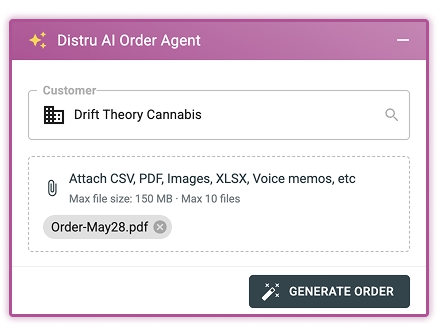
Distru's AI Order Agent is scoped to one job: turning an incoming order into a clean sales order and checking it against inventory. It doesn't have standing access to your compliance filings or your financial records. It proposes a sales order. Your rep reviews it before it ships. That's a defined, narrow slice of write access, not a blank check.
Why Narrow Scope Is a Feature, Not a Limitation
A tool scoped to one task is easier to trust, easier to audit, and easier to explain to a state inspector if you ever need to. "It only touches order entry, and a person reviews everything before it ships" is a sentence you can say with confidence. "It has full access to everything and we're not entirely sure what it might do" is not.
Questions to Ask Before Granting Any Access
Before you connect an AI tool to your ERP, get specific answers to a short list of questions.
What Can It Read, Specifically?
Not "your data." Which tables, which records, which fields. If a vendor can't answer this precisely, that's a sign they haven't scoped it carefully either.
What Can It Change, and Does Anything Ship Without Review?
This is the question that actually matters for compliance risk. Anything that touches a customer order, a compliance record, or a filing should have a person reviewing it before it's final. No exceptions, regardless of how confident the tool seems.
What's the Audit Trail?
You should be able to see exactly what the tool did, when, and why, the same way you'd want visibility into any process affecting compliance-sensitive data. A tool that acts and leaves no trace is a black box, and black boxes are a liability in a regulated industry.
The Bottom Line
Access isn't a yes-or-no decision, and treating it that way is how operators end up either locking AI out entirely, missing real time savings, or granting broad access they don't fully understand. Scope the access to the task, keep a person reviewing anything that matters, and you get the upside without the exposure.
A Simple Framework for Evaluating Any AI Feature
Instead of asking "is this safe," which is too broad to answer well, break it into three smaller questions every time.
What's the Blast Radius?
If this tool makes a mistake, what's the worst realistic outcome? A drafted email that's wrong is a minor annoyance. A miscategorized inventory adjustment that goes unnoticed is a bigger problem. Rank features by blast radius, not by how impressive they sound.
Is the Access Reversible?
Some actions are easy to undo. Others, like a submitted compliance filing, aren't. Tools touching irreversible actions need a much higher bar for review than tools touching things you can easily correct.
Would You Be Comfortable Explaining This to an Inspector?
If you can clearly explain what a tool can access and why, and that a person reviews anything that matters, you're in good shape. If the honest answer is "I'm not totally sure what it can do," that's the signal to pull back access until you are sure.
Want to see exactly what scoped AI access looks like in practice? Talk to Distru and we'll walk through it.