

If you run a cannabis operation, credits are part of everyday business. Damaged shipments, short orders, overpayments, or pricing disputes all create credits that need to be tracked accurately across AR, inventory, and accounting, while keeping a clear audit trail for compliance and your CPA.
Introduction: Credit Memos in Distru + QuickBooks Sync
Managing credits in Distru no longer requires workarounds like manual ledger entries, notes in customer records, or spreadsheet tracking. Distru's new Credit Memos feature brings native credit management directly into your workflow, with visibility where you need it and automation that keeps your books clean.

Here's what's new: a Credit Balance column in your Companies table shows which customers carry credits at a glance. Click into any customer record to see their complete credit balance and history. Most importantly: when creating a sales order, if that customer has available credits, Distru surfaces that information right there in the order screen. No more discovering unused credits during month-end reconciliation.

You can generate credits three ways: manually add them through any customer record, automatically create them from overpayments, or configure returns to generate credits when completed. Once credits exist, apply them with precision, let Distru pull from the oldest credit automatically, or manually select which specific credit to use.
For QuickBooks Online users, credits sync bidirectionally with an important setup consideration. When you enable two-way sync, credit memos flow smoothly between systems, but understand how that sync handles existing data before you flip the switch. We'll walk through exactly how to create credits, apply them to invoices, configure return-based credits, and set up QuickBooks syncing the right way.

Visibility & Control: Credit Balances Across Companies, Customer Pages, and Sales Orders
When you issue a credit memo in Distru, the credit doesn't just sit in your accounting system waiting to be discovered at month-end. Distru surfaces credit balances everywhere your team actually works, so you can see what customers are owed before you invoice them, call about a past-due balance, or accidentally double-collect.
Distru now treats credit balances as first-class data, visible in three critical places: the Companies table shows a Credit Balance column at a glance, every customer page displays their current credit balance at the top, and when creating a sales order, you'll see any owed credits right there during order creation. That last one is the game-changer for order entry teams.

Why does this matter for cannabis operators specifically? Your A/R workflow is already complicated enough, juggling varied payment terms, handling quality disputes weeks after delivery, keeping books clean while your sales team focuses on moving product. When credit balances are buried in your accounting system, three things happen:
- Your sales team invoices customers who should have credits applied first.
- Your collections team wastes time chasing balances that are actually already covered by credits
- Your finance team spends hours at month-end hunting down unapplied credits that are throwing off your A/R aging report.
The workflow improvement is immediate. Before invoicing, your team sees: "This customer has $150 in available credits. Apply it now, or save it for that disputed invoice from last month?" After applying a credit, navigate back to confirm the new balance in real time. That visibility means customer statements always align with what your internal team sees, eliminating the "wait, I thought we had a credit?" conversations that eat up your AR specialist's time.
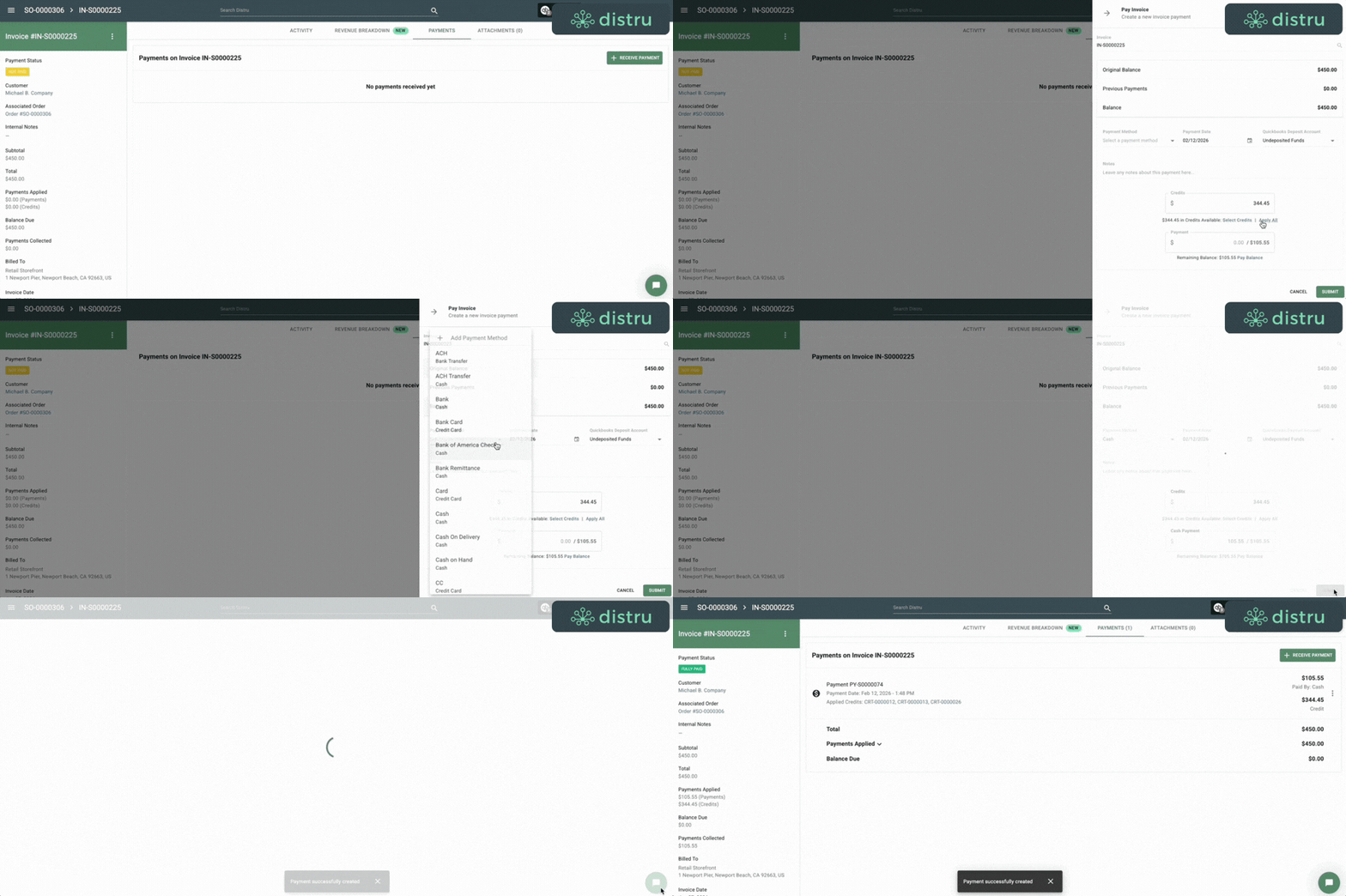
Creating Credits in Distru: Manual Credits, Overpayments, and Returns
Distru gives you three distinct ways to create credits, each designed for different real-world scenarios that cannabis operators face daily. Understanding when to use each method helps you maintain clean books while keeping your customers happy.
Customer Credit Types and Workflows
Credit Types in Distru
Quick reference for when to use each credit type and how it’s created in Distru.
| Credit Type | Purpose | How It Works in Distru |
|---|---|---|
| Manual Credits | One-off adjustments (pricing disputes, promo fixes, goodwill gestures) | Created from a customer profile via the three-dot menu → “Add a credit manually.” You control the amount and reason. |
| Overpayment Credits | Handling payments that exceed an invoice total | Distru marks the invoice as fully paid and automatically converts the extra amount into a customer credit, visible on the invoice detail page. |
| Return-Driven Credits | Issuing credits when customers return products | When creating a return, check “Create a credit when this return is completed.” Distru generates the credit automatically once the return is finalized. |
To ensure consistency across your team, Distru includes a powerful setting in your company configuration. Under return settings, you can enforce that credits are always created when returns are completed. When this setting is enabled, the "create a credit" checkbox on every return form will be pre-checked and locked, preventing team members from accidentally skipping this step. This enforcement helps standardize your processes and ensures that every return generates the appropriate customer credit without requiring manual follow-up.

One final detail that provides important flexibility: credits can be canceled or deleted before they've been used. If you create a credit in error or need to adjust the amount before a customer applies it, you can make those corrections without affecting your accounts receivable. Once a credit has been applied to an invoice, however, it becomes part of your payment history and requires a different approach to reverse.
How to Apply Credits to Invoices in Distru (FIFO vs. Manual Selection)
Once you've issued a credit memo, applying it to outstanding invoices is straightforward. Distru gives you complete control: let the system automatically pull from the oldest available credit with a single click, or manually select exactly which credit to redeem. This flexibility matters, sometimes you want to clear out old credits quickly, other times you need precise control over which transaction gets applied where.
How Credits Are Applied to Invoices
Different ways to apply customer credits depending on speed, control, and payment structure.
| Credit Application Method | Purpose | How It Works in Distru |
|---|---|---|
| One-Click “Apply All” | Fastest way to settle an invoice using available credits | Clicking “Apply All” automatically applies the oldest customer credit to the invoice. If the credit fully covers the balance, the invoice is marked paid; if extra remains, it stays on the customer’s account. |
| Manual Credit Selection | Precise control over which credit memo gets applied | Users can view all available credits and choose the exact one to apply. Useful for promotional credits, issue-specific credits, or cleaner reporting and matching. |
| Partial Payments & Mixed Tender | Handling invoices where credits don’t cover the full amount | Credits can be applied first, and the remaining balance can be paid via cash, check, or ACH in the same flow. The invoice shows separate line items (e.g., “paid by credit” + “paid by cash.”) |
After any credit application, the invoice record provides complete transparency. You'll see exactly which credit memo was used, how much was applied, and what payment source covered any remaining balance. Meanwhile, the customer's credit balance updates immediately, showing you what's left available for future invoices. This real-time visibility means your AR aging reports stay accurate, your team always knows what credits are still outstanding, and customers can see exactly how their account credits were used when they review their statements.

QuickBooks Online Two-Way Sync & Implementation Guidance
When you create a credit memo in Distru for a customer linked to QuickBooks Online, that credit automatically syncs to QBO, no manual data entry. If a payment uses a credit to offset an invoice balance, Distru automatically debits the corresponding credit memo in QBO, so your books reflect exactly what happened. You'll see credit memos, payments, and credit applications in your QBO customer records, all documented and audit-ready.
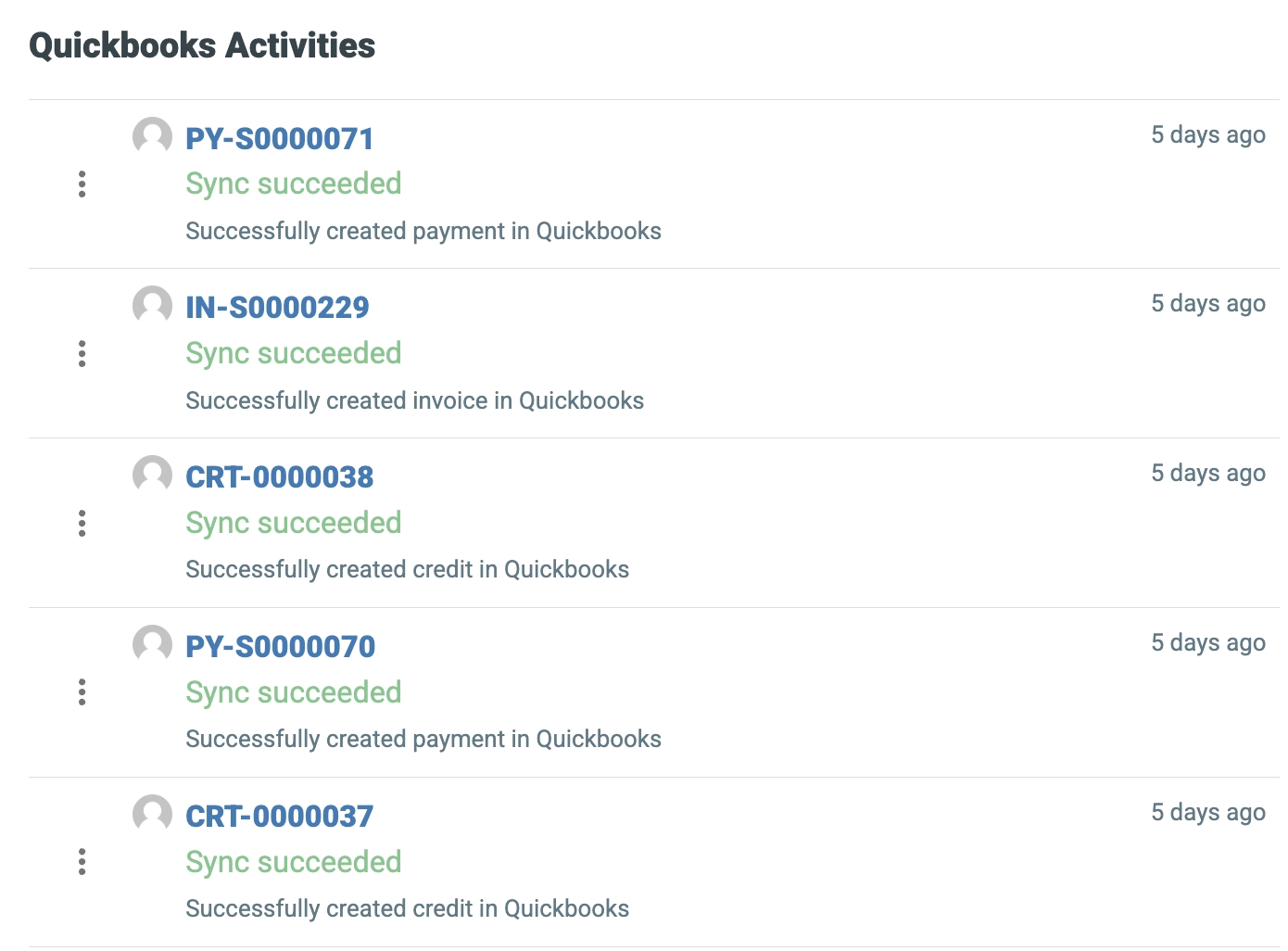
Here's the critical detail around implementation for existing integrations
Credits created in Distru only sync to QuickBooks Online with two-way sync enabled. Without it, these credits live only in Distru. The exception: returns themselves can create credit memos in QuickBooks even without two-way sync using the existing Integration’s functionality.
Two-way sync is powerful but it does change things. Once enabled, QuickBooks becomes the source of truth for payments and credits on linked customers, and Distru will be updated to match QuickBooks. Payments or credits recorded directly in QBO on Distru-originating Invoices will be imported into Distru, and any credits created in Distru prior to initiating this sync will be cancelled. Moving forward, Payments and Credits applied in QBO directly will be updated to reflect in Distru as well. This isn't a bug, it's how you maintain consistency across platforms.
Best Practice: Enable Two-Way Distru + QuickBooks Sync Early
Before you've accumulated a backlog. The longer you wait, the more discrepancies you'll reconcile later.Quick rollout: verify linked customers, review existing payments and credits in both systems, communicate expected changes to your team, then enable the feature. Your finance team needs to know that editing in QuickBooks will override Distru once two-way sync is on.
Get Started with Credit Memos
Already on the Distru platform? Reach out to our team for help getting started with credit memos.
Interested in learning more about Distru and how credit memos can simplify your A/R workflow? Schedule a demo and let's walk through it together.
Conclusion
At Distru, we build features like Credit Memos because we understand operational friction in real cannabis businesses. Built by operators, for operators, rooted in day-to-day compliance and high-volume workflows.
Already a Distru customer? Thank you for growing with us. We'll keep improving as the industry evolves.
Not using Distru yet? If you want cleaner A/R, tighter QuickBooks alignment, and fewer customer disputes, schedule a demo. We'll walk through it together.


