AI Skill
Cultivation & Production
Distru Production Forecast
Know how much of each product to make this week, based on real sell-through.



This is a starting template. Change the questions, thresholds and output to fit how you work. AI can make mistakes, so check the output before you act on it. Report an issue
The problem it solves
You plan production runs off last month's gut feel and end up long on slow SKUs and short on fast ones.
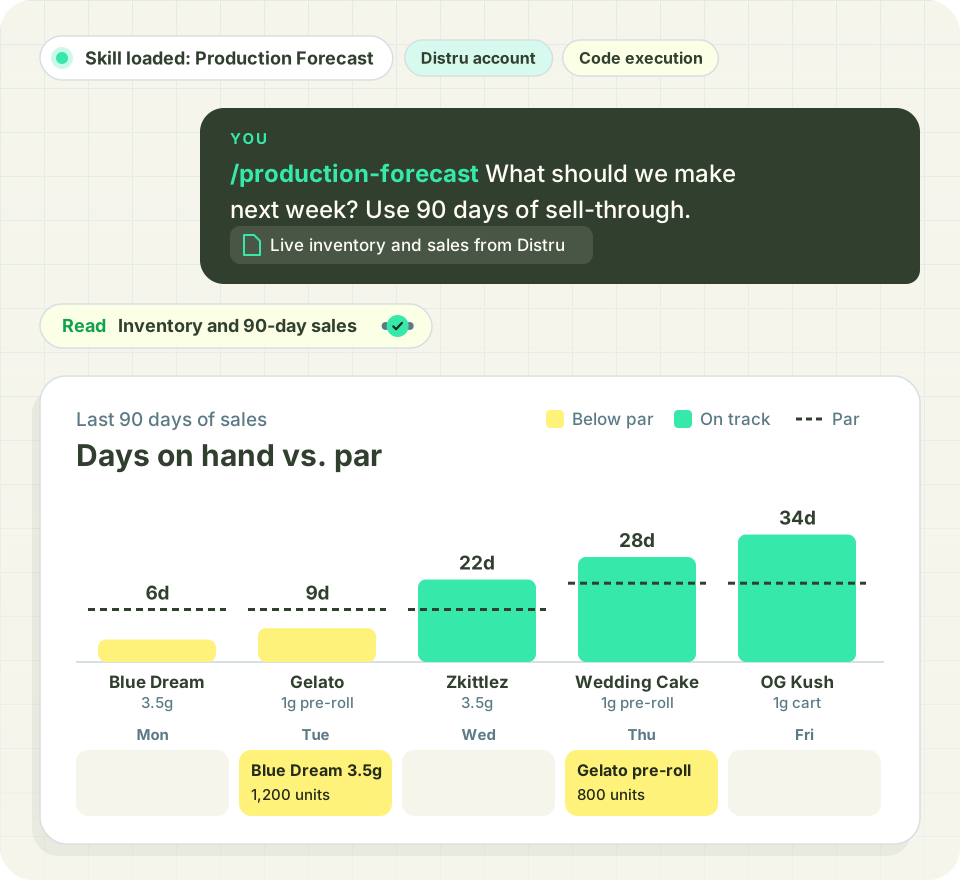
The skill turns Distru sales and inventory into a production plan. It asks four questions up front: your sales baseline, weeks of stock to cover, safety buffer and when a product counts as slow-moving. A bundled script does the math, so results match every run.
It returns three lists: production needed, slow movers to hold, and products with more reserved on open orders than on hand.
What you'll need
Have these ready before you start.
- Answers to four questions: sales baseline, weeks of stock, buffer %, slow-mover threshold
- The Distru MCP connector (read-only), or Inventory Valuation and Sales By Product exports from Distru
- Optional: a single product or specific locations
- An AI assistant that can run Python for exact results
What the AI does
- Calculates a make quantity for each product in its own unit type
- Counts incoming purchase orders and open assemblies toward stock
- Flags products selling well above baseline with a second quantity at the current pace
- Leaves out packaging, parts and components by default and skips inactive products
What you get
A report with the three lists and the settings used, plus an optional CSV of every product. In a sample run on a 3.5 g flower SKU with a 6-month weekly average, 6 weeks of stock and a 10% buffer, it found 22 units sold (0.8 a week), a 6-unit target and 127 on hand, so the make quantity was 0. It also noted all 22 sales came in the last two weeks, a pace to watch before the next run.
Built for Distru. Over the Distru MCP, open orders, POs and assemblies are already in the math, so the forecast reflects what's committed, not just what sold.
Frequently Asked Questions
Let’s answer the most commonly asked questions about Cannabis Software.
How does the Distru Production Forecast skill decide how much to make?
It takes your average weekly sales over the baseline you pick, covers the weeks of stock you want, and adds your safety buffer. Then it subtracts what's on hand, incoming on purchase orders and sitting in open assemblies. What's left is the make quantity, in each product's own unit type.
Do I need a Distru account to use this skill?
Yes. It reads sales and inventory from Distru through the read-only Distru MCP connector, so open orders, POs and assemblies are already in the math. It's the one skill in the library built just for Distru customers.
Will the forecast change anything in Distru?
No. The connector is read-only. You get a report in chat with three lists and the settings used, plus an optional CSV of every product. Creating the production run stays with your team.
What does the forecast leave out?
Packaging, parts and components are left out by default, and inactive products are skipped. You can also narrow a run to a single product or specific locations when you're planning one line.

